
Try Compass: Terra Professional Free for 30 Days
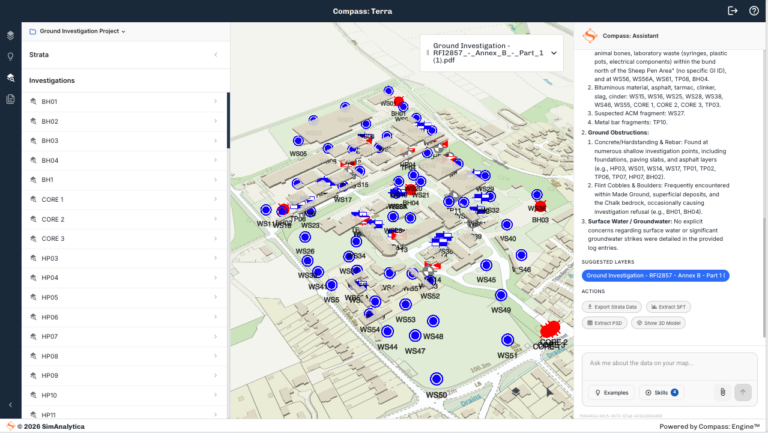
Get full Pro access — no credit card required. Transform your PDFs and AGS files into an interactive 3D model in seconds
- ➤ View your data on a map
- ➤ Ask questions with a verified AI assistant
- ➤ Stratigraphic column, SPT and particle size visualisation
- ➤ Export to AGS, CSV and GIS
How Compass: Terra Works
1
Upload, digitalise and visualise in seconds
2
Interrogate in natural language
3
Visualise strata, test data and results
4
Export to AGS, GIS and CSV
Start with a free 30-day Pro trial, then choose your plan:
FREE
£0/month
- Data:
- Upload a single PDF or AGS file
- Analytics:
- Interrogate using the AI Assistant
- Visualisation:
- Borehole geolocation
- Site context in 2D, 3D and satellite imagery
- Digitalised logs
- Original log document
- Export:
- AI project summary
- Digitalised log data
- Management:
- Email and password sign in
Professional
£99/month or £999/yr
Start Free Trial
No credit card required — full access for 30 days
- Data:
- Upload multiple PDF and AGS files
- Analytics:
- Interrogate using the AI Assistant
- Stratigraphic column
- Strata volumes
- Visualisation:
- Borehole geolocation
- Site context in 2D, 3D and satellite imagery
- SPT visualisation
- Particle size density visualisation
- Original log document
- Strata in 3D
- Export:
- AI project summary
- Digitalised log and test data
- AGS and GIS file formats
- Management:
- Email and password sign in
- Save up to 12 projects
Enterprise
Contact Us
- Professional plus:
- CAD data import/export
- Site plan and finish levels
- Multiple organisational users
- Unlimited projects
- Upload your own GIS layers
- Premium contextual site data sets
- Auto report generation configured to your brand
- Integration with your information and document management system
Would you like a walk-through of Compass: Terra?
Our team is on hand to onboard you into Compass: Terra and explain the features and analysis that you can perform in the tool.
Fill in the form, and our team will get back to you with more details.
"*" indicates required fields